
Find WordPress sites and their contact details.
Type a keyword like “plumber manchester” or paste a list of domains. WP Finder checks every site, shows which ones run on WordPress, and pulls their emails, phone & WhatsApp numbers and social media links — then email them with automatic follow-ups, or export to Excel.
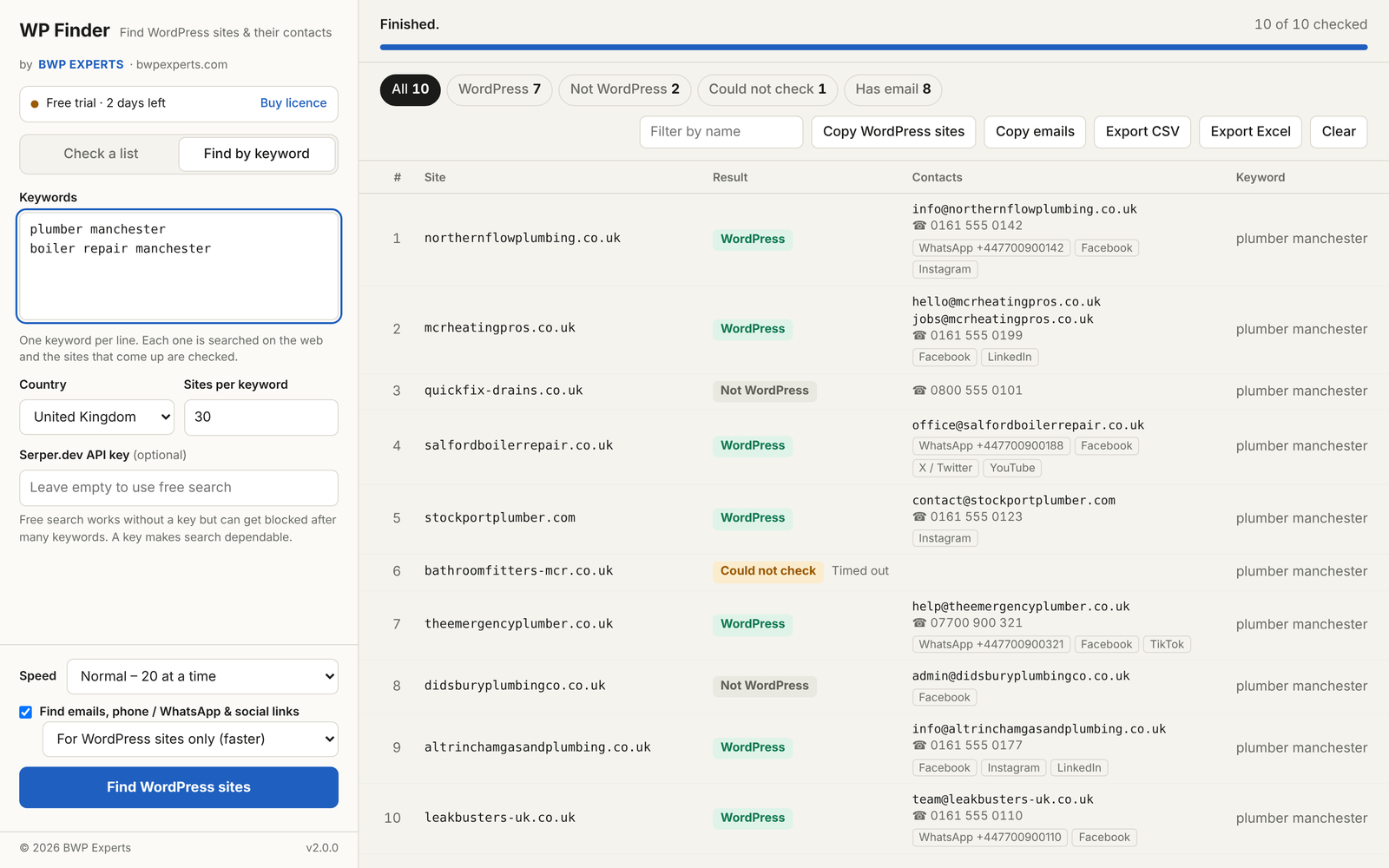
Build a lead list in minutes
Built for web designers, SEO agencies, WordPress developers and anyone who sells to website owners.
Find sites by keyword
Search any niche and country. WP Finder collects the sites that rank and checks each one automatically.
Accurate WordPress check
Looks at themes, plugins, REST API, login page and more — not just a guess from the homepage.
Email finder
Pulls emails from the homepage, contact and about pages — even ones hidden by Cloudflare or written as “name [at] site”.
Phone & WhatsApp
Grabs click-to-call numbers and WhatsApp chat links so you can reach site owners directly.
Social media links
Facebook, Instagram, LinkedIn, X / Twitter, YouTube, TikTok, Pinterest and Telegram pages.
Excel & CSV export
One click gives you a clean spreadsheet with a column for every contact type. Copy all emails too.
Check your own lists
Paste thousands of domains or load a .txt / .csv file. Duplicates are skipped for you.
Fast
Checks up to 40 sites at the same time, with results showing live as each site finishes.
Simple license
The free trial starts by itself. After you buy, paste your key, click Activate and you’re done.
Email sender with follow-ups
Email the contacts you find from your own Gmail, Outlook, Zoho or Hostinger mailbox. Personal templates, daily limits, automatic follow-ups and unsubscribe links.
Try it free, then one simple price
Every plan includes all features. One license works on one computer.
Free trial
Everything unlocked for your first 150 sites.
150 sites · no card · no key
- Starts automatically on first launch
- Keyword search & list checking
- Email, phone, WhatsApp & social finder
- Excel & CSV export
- Upgrade any time
Monthly
Unlimited use, month by month.
per month · web + Windows app
- Use it on the web and on Windows
- Unlimited keyword searches & site checks
- Email, phone, WhatsApp & social finder
- Built-in email sender with follow-ups
- Excel & CSV export
- Free updates & support
- License key delivered instantly
Secure checkout · Your license key appears in your account right after payment
Start in 1 minute
No installer — just unzip and open.
- Download. Get the zip below and unzip it. You’ll find
WPFinder.exe. - Open it. Double-click
WPFinder.exe. If Windows shows “protected your PC”, click More info → Run anyway. - Use the free trial. Your free trial (150 sites) starts by itself. Search a keyword or paste a list and press the button.
- Activate. After you buy, copy your key from My Account → License keys, click Buy licence / Licence in the app, paste it and click Activate.
Download for Windows (Desktop app)
Free to download — your first 150 sites are free, then it needs a license key.
Questions, answered
Do I need a key for the free trial?
No. Open the app (or log in to the web version) and your free trial of 150 sites starts automatically. The bar at the top-left shows how many free sites are left.
How do I activate after buying?
Copy your license key from the order email or My Account → License keys. In WP Finder click Buy licence / Licence, paste the key and click Activate.
Can I use one license on two computers?
One license works on one computer at a time. If you change computers, contact us and we’ll release the license so you can activate it on the new one. Need several computers? Request a custom plan.
Where do the emails and numbers come from?
Only from the public pages of each website — homepage, contact and about pages — the same details the owner shows to their visitors.
Do I need a search API key?
No. Free search works out of the box. For very large jobs you can add your own Serper.dev key for more dependable searching.
What happens when my month ends?
The app asks you to renew. Buy another month and activate the new key — your settings stay as they were.
Does it work on Mac?
Not yet. WP Finder runs on Windows 10 and Windows 11.
Stop building lead lists by hand.
Find WordPress sites, get their contacts and email them in one go — your first 150 sites are free.